
My mom would tell me I am bad at throwing away things. And frankly, I am. Not only in the physical world. Also in the digital. I agree about cleaning things and getting rid of things I don't need anymore. But some of them I can still use later and make cool conclusions... right?
This post shows all step involved in the analysis: acquiring the data, exporting, writing the script. If you are just here for the graphs and the fancies directly, shamelessly hit the button:
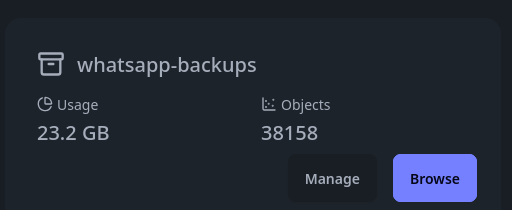
Moving from one device to another (be it a smartphone or a laptop) always meant: strict backupping and restoring of data. That's why WhatsApp Backup currently also uses more than 20 Gigabytes... whoops.. And there's another 16 gigs for my Threema data.
Many years back, I wrote a small tool (with Bootstrap and PHP!) that was capable of analyzing one (1) WhatsApp Chat, and display some simple graphs. It took me weeks. It was pain, since it was parsing the exported textfiles.
But these days, we have AI ✨
While I am not a fan of replacing your entire thoughtwork with OpenClaw, I do think some use of AI can greatly increase our quality of life.
So one Thursday night, the idea was born: I wanna know what's going in my chats.
Here a short overview of what will be included and what will not:
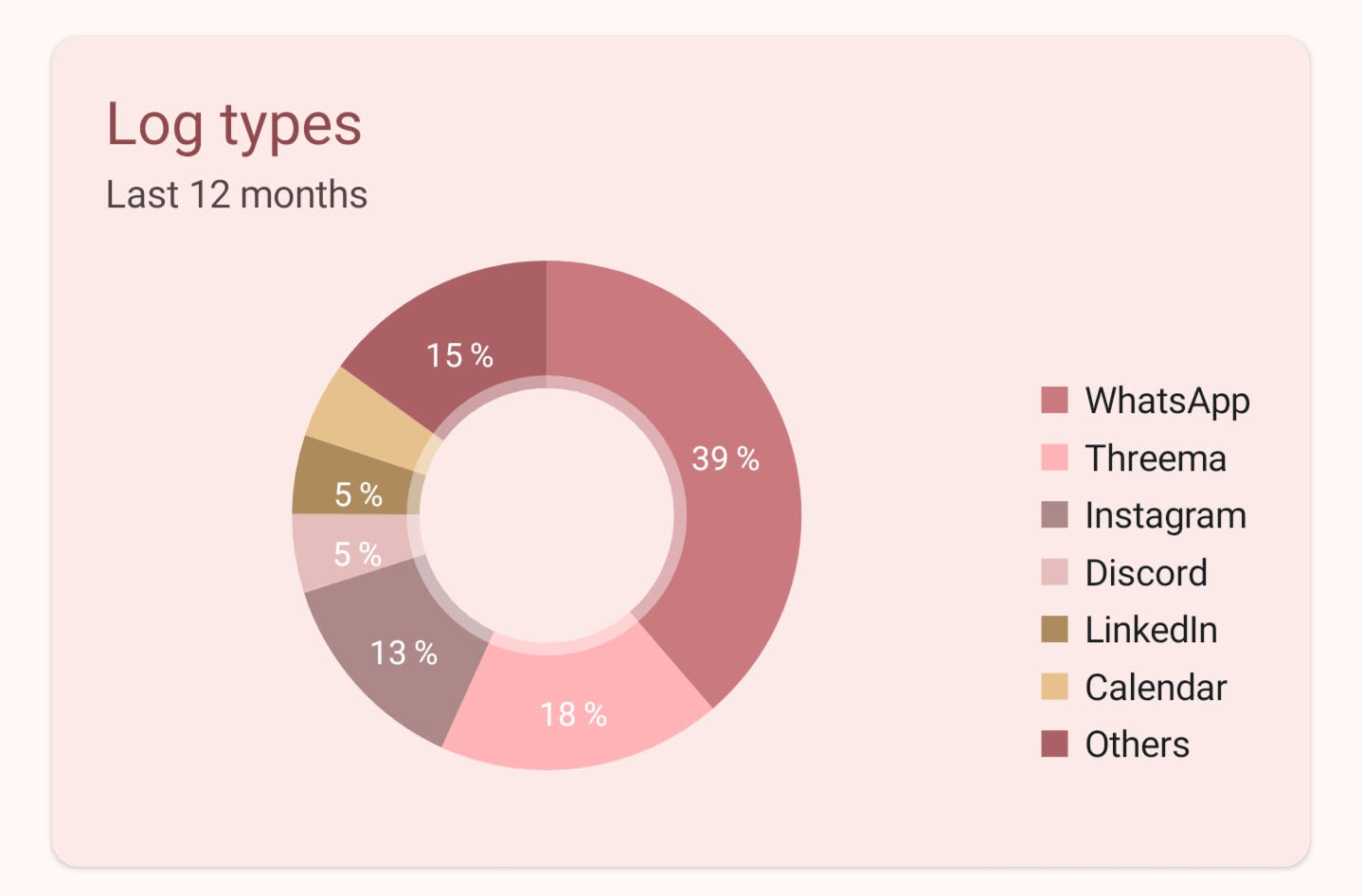
In-Scope: Private communication (texts, voice messages, calls) on WhatsApp & Threema. According to the Smart Contact Reminder App I am using, this represents about 76% of the communication on my phone (correcting for apps I'd not consider communication)
Out-of-Scope: Work-Calls (non-private), E-Mails (low volume anyway), Instagram (occasional, low-volume), Discord (haven't bothered to export data from there - affects one friend group that will score high anyway)
Step 1: Acquiring the Data
Somewhat quirky. By default, WhatsApp encrypts your backups (good!) with a key, that it does not give you access to (terrible!). Several hacks were available to obtain the key from your phone up to Android 13, but guess who's running on Android 14? 🙋🏽♂️
End-To-End-Encrypted Backups (yay!) come to the rescue. This means not even WhatsApp (or Meta, for that sake) will be able to decrypt your backup when you lose your key, but it means that you are in possession of your key to your data. Sounds like a win to me.
So, after enabling the E2E-Encryption, creating a backup and moving it to a folder on my computer, let's start the decryption using the tools from KnugiHK/WhatsApp-Chat-Exporter on Github.
# Pull files
adb pull /storage/emulated/0/Android/media/com.whatsapp/WhatsApp/Backups/wa.db.crypt15 .
adb pull /storage/emulated/0/Android/media/com.whatsapp/WhatsApp/Databases/msgstore.db.crypt15 .

# Decrypt them with key

wtsexporter -a -k KEY_KEY_KEY_KEY \
  -b msgstore.db.crypt15 \
  --wab wa.db.crypt15 \
  -j --per-chat --pretty-print-json \
  --no-html
I had ADB ready anyway, so using it to transfer the files seemed like a no-brainer.
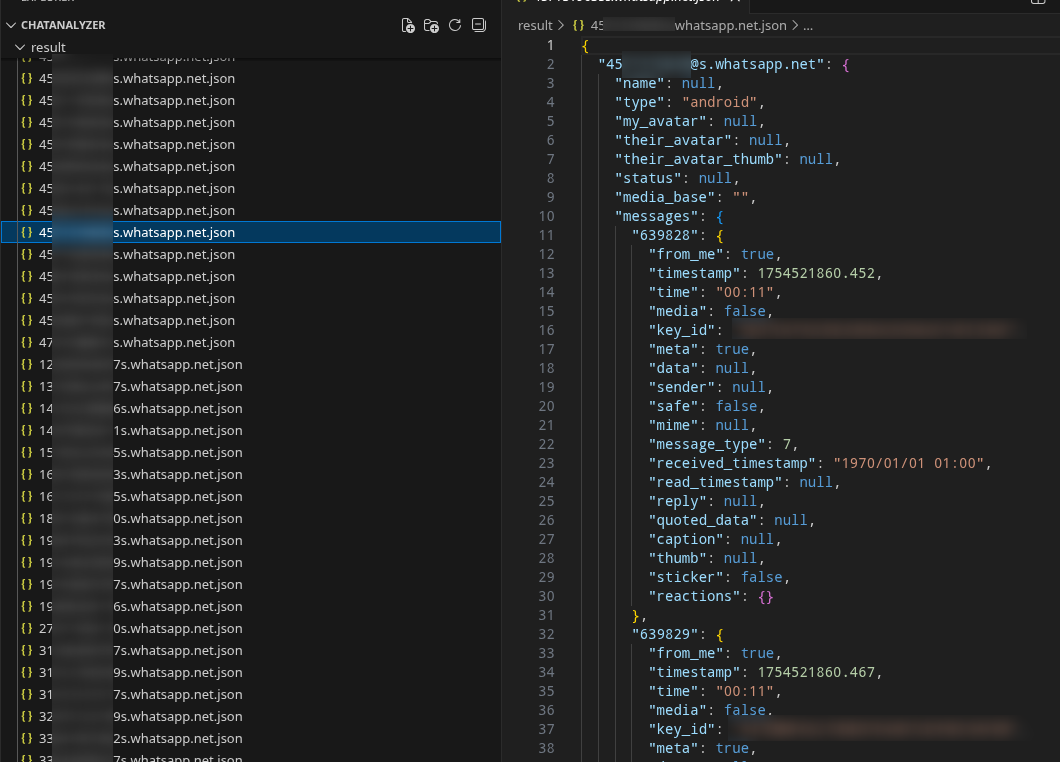
And just like that, we get our chats as JSON Files!
Threema
Child's play. Open the Backup Menu, say you want to backup, choose a password et voilà. Move to your device and unzip the password-protected archive with 7zip.
adb pull '/storage/emulated/0/Threema Backup/' . && \
  cd 'Threema Backup' && \
  7z x threema-backup_1774562561081_1.zip
EASY!
Threema itself uses CSV in their backups and additional files to attribute files to contacts:
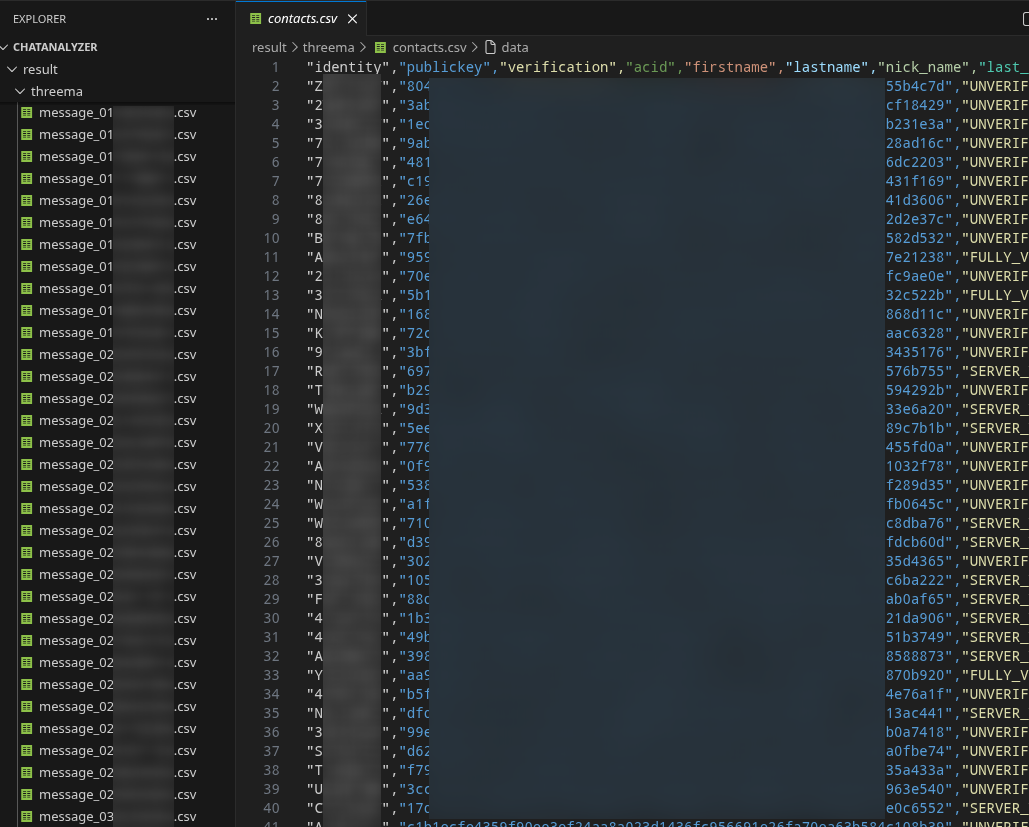
Contacts
Since WhatsApp does not store your contacts (your phone does), it is advisable to download all your contacts from your phone (or from Google Contacts, in my case) as one VCard (vcf) File. This will help attributing numbers to contacts later.
Step 2: Offloading work to LLMs
And that'd be the real painful part, right?
Coming up with all the parsing yourself, writing code for interpretation... ehm.
Good we don't have to do that. I selected a few Whatsapp Chats, as well as the call logs, anonymized them, and gave them to Copilot.
And after a few iterations of improvements I was able to make my first analyses! Not a lot of this stage is left-over, because the code has already moved on, but here a few screenshots I shared to friends during the process
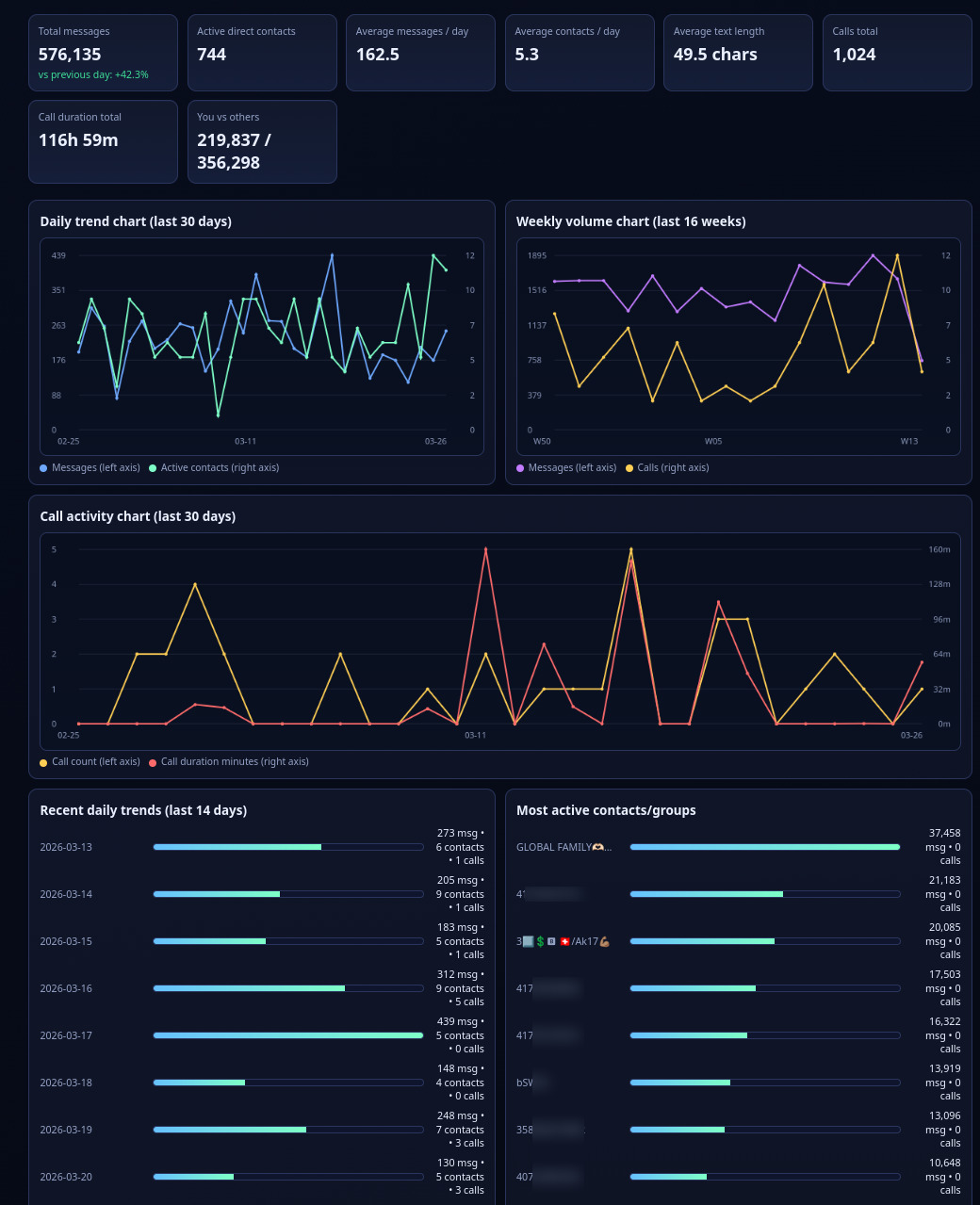
Now that the WhatsApp Part was considered done, I wanted to figure whether the Threema Part is relevant. The Contact counter app suggest it does, but can't hurt to verify a second time, right? So I found and quickly started maxiking445/threema-chat-analyzer and loaded my backup there.
docker run -d -p 5670:80 --name threema-chat-analyzer ghcr.io/maxiking445/threema-chat-analyzer:latest

# Now browse http://localhost:5670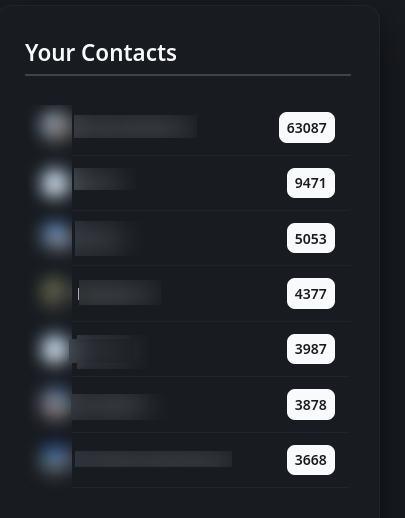
Aaaah yes. There's no way of skipping that. So re-prompting my good friend Chatty to please give me an option to parse Threema Data as well and offer me a way to associate Threema Contact IDs (Threema Accounts are not linked to phone numbers) to WhatsApp Contacts. And also, to use a vCard File for Contact Names if provided.
Step 3: Loading Data and Associating Contacts
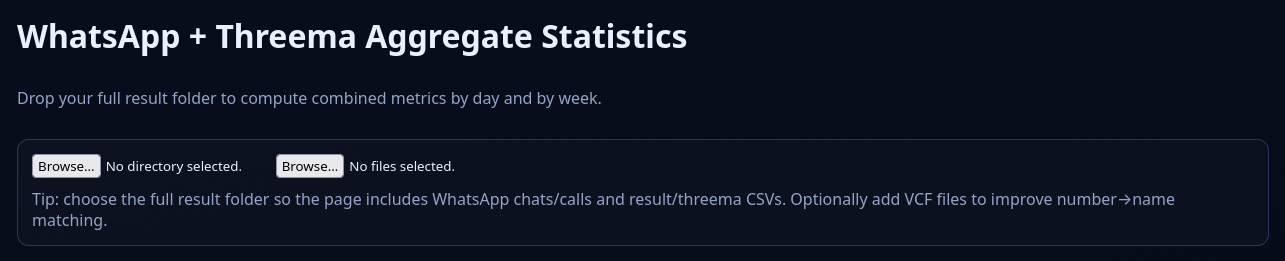
Doing as instructed and associating contacts, where close-name matches are suggested on the right:
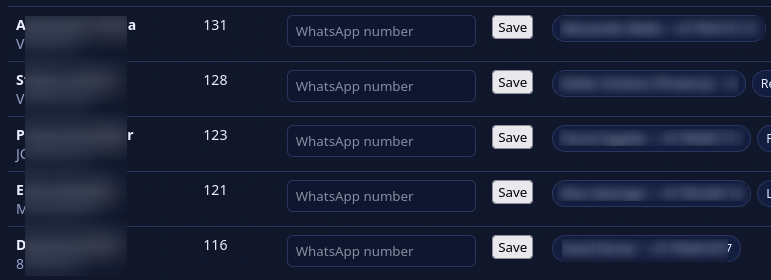
Last but not least, tuning the data a little, as well as enabling anonymous mode and enabling logarithmic charts before I dive into my data.

Ready?
Step 4: Analyze!
Needless to say that while analyzing, various reprompts were made to show data differently and add optimize charts.
So let's dive.
The Overview
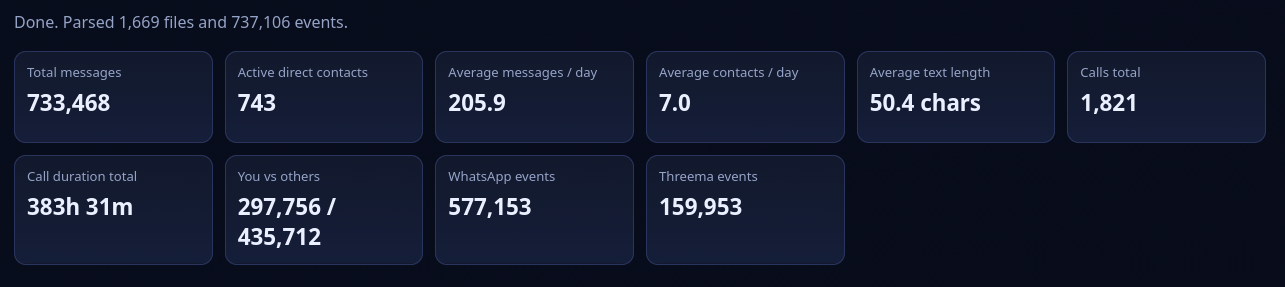
Wow. Since 2015, 730k messages recorded with an average of 205 messages per day with a split of 78%/22% to WhatsApp and Threema respectively.
The average text length seems interesting to me, since I seem to be a very explicit (and long) texter. 50 chars is merely ~10 words, so it seems to happen that I also write (or receive) many short messages at times.
For the charts right down here, I will focus on data from 2025
2025 Stats
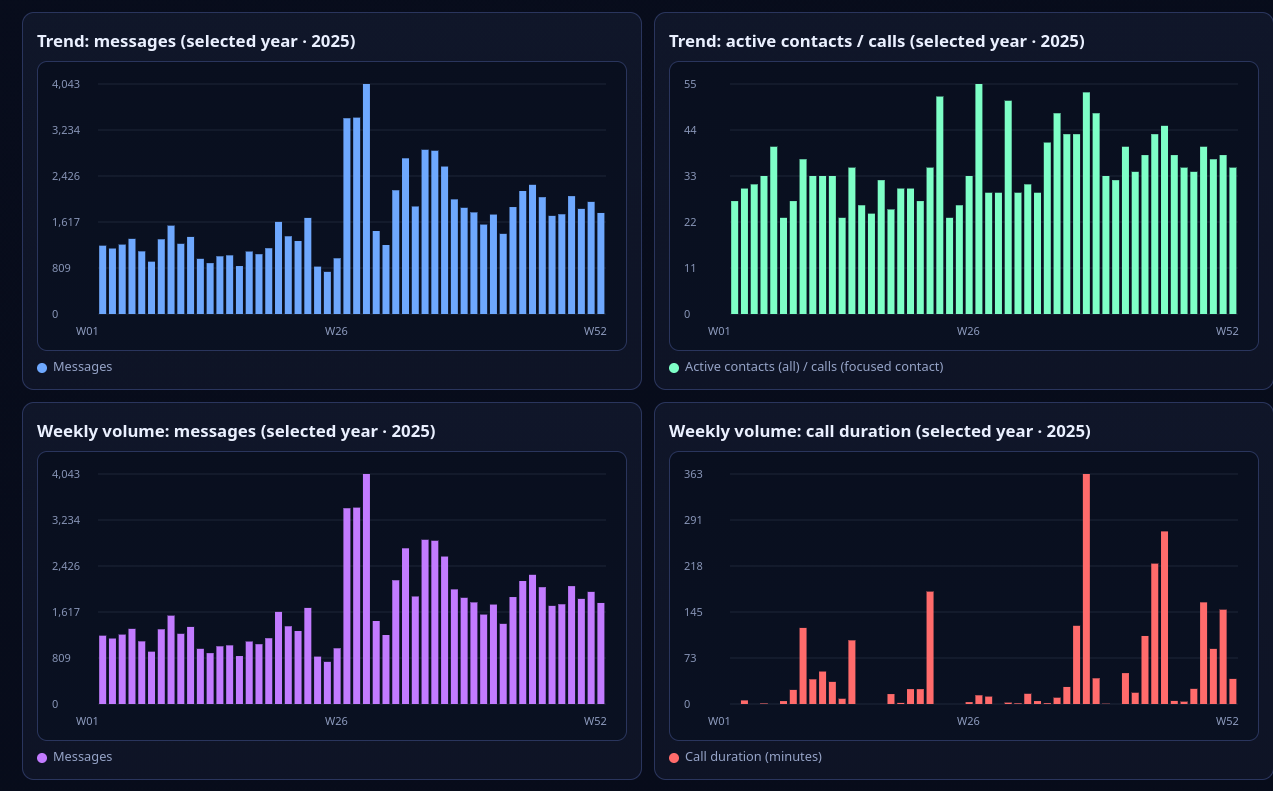
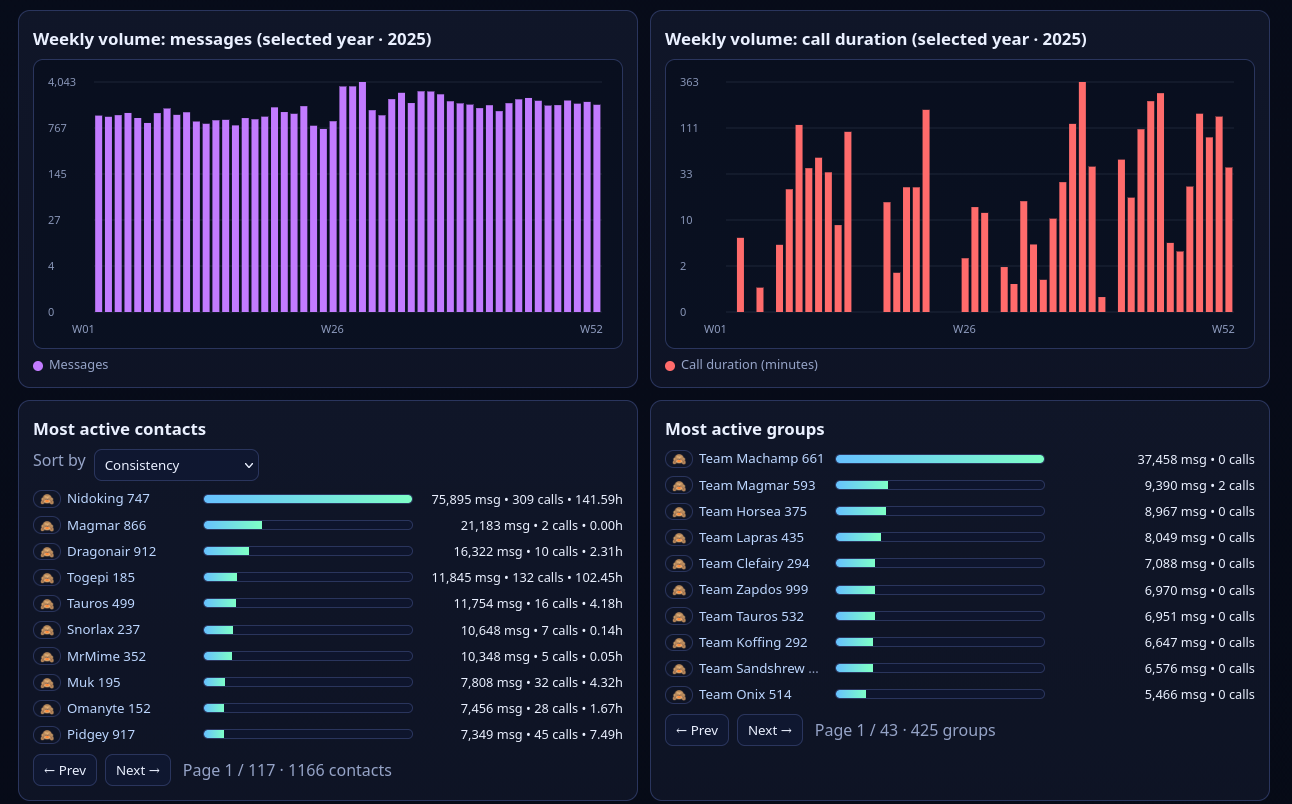
In general, we observe a rise in messages in the second half of 2025, together with a slight rise of contacts. There is a spike shortly after the mid of the year in messages (goodbye-party plannings and b-day). Very evident is the rise of the call volume since I moved to Denmark in August. That checks out.
Anomalies & Histograms
Speaking of that, do we have anomalies? I am now studying Bioinformatics, so of course I need to do include a histogram plot here (@Leon if you read this let me know)
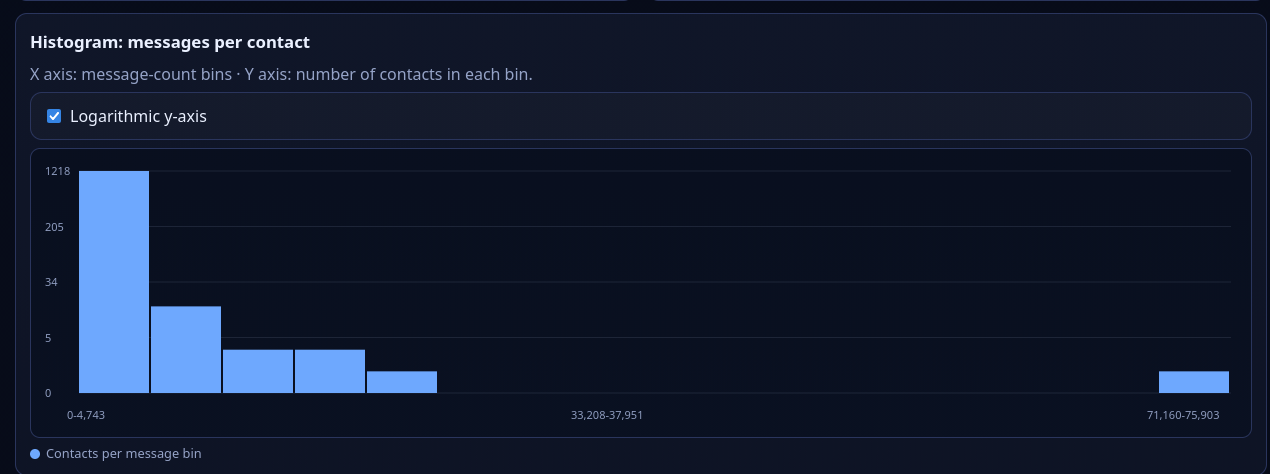
Cool! Just as we would expect, a somewhat (very strongly) exponentially decaying curve, One outlier at 70k+ messages from a good friend living far away and where meeting is hard. Also checks out.
Cliffhanger, before we move on...
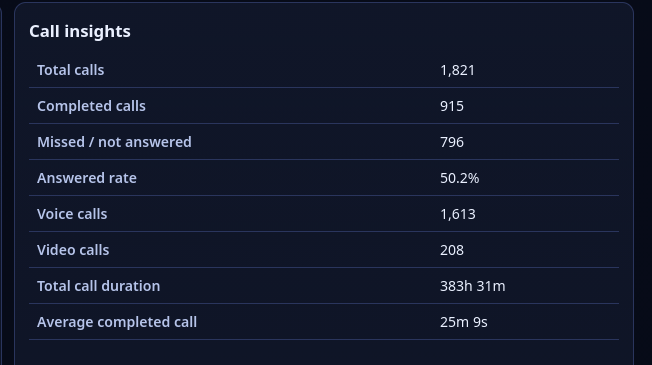
That's a funny one. This data suggests that half of all the calls go unanswered. You missing them or I missing them. Made me laugh. Only about 11% of calls are video calls.
And the winners are...
Since we already established the outlier above, it's clear that 'Nidoking 747' is also the winner here, with peaking contacts in 2021 and 2022. The next contact lags more than 50'000 messages behind.
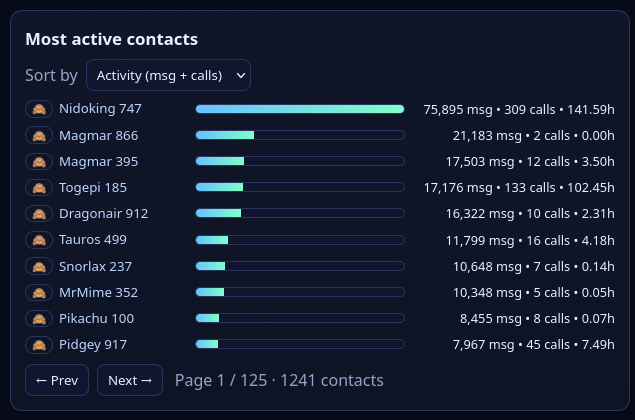
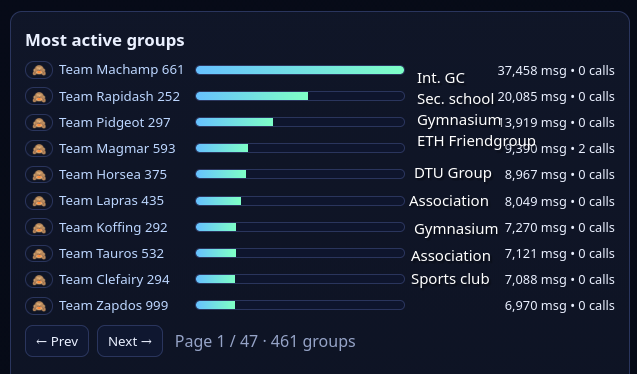
Most active contacts and most active groups (2015-). Groups have been annotated with categories
But hey, a lot of messages are not necessarily an indicator of quality, right?
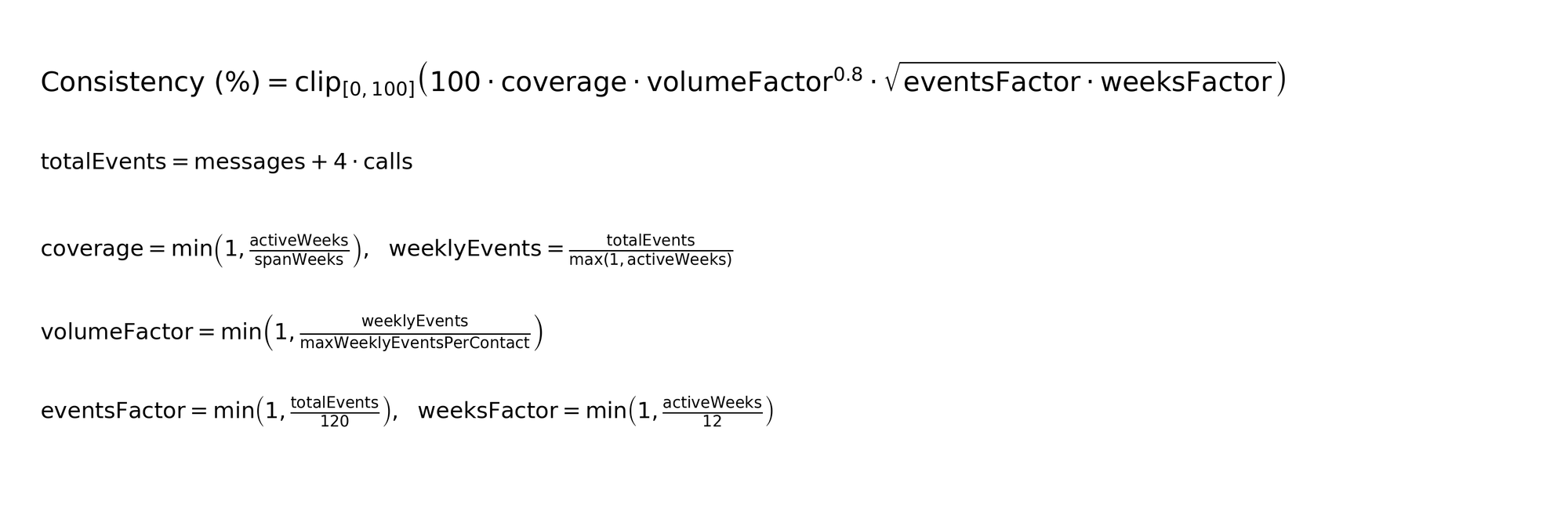
That's why I let the LLM add a consistency mode, assigning a score between 0 and 100.
I'll let the LLM explain what it did:
I use aconsistencyscore to capture steady, meaningful contact over time — not just raw volume spikes.
Design choices:
* Calls are weighted more than texts (messages + 4*calls) because a call usually signals stronger interaction.
* I reward regular presence across weeks (coverage), so bursty one-off chats score lower.
* I normalize by each contact’s weekly intensity vs the strongest contact (volumeFactor) so the score is relative to your dataset.
* I add a stability gate (enough total events and enough active weeks) to prevent inactive contacts from scoring high by accident.
Or, in maths:
This changes the landscape a bit:
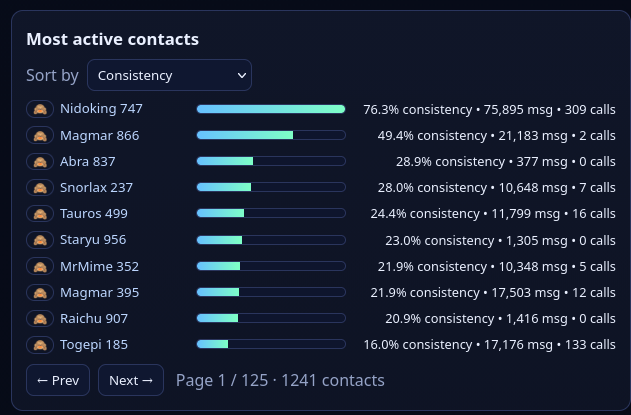
While Nidoking continues to stay on the top, there are some shifts. Abra 837 is definitely an undesired outlier. And to be honest? I didn't dive deep deeply into the formula and it might be trash altogether 😄. It would be interesting to see analyses of other people with this methodology to compare.
Yearly aggregated bars
I had a look at the yearly aggregated bars, and clearly, they start spiking from the year 2020 on.
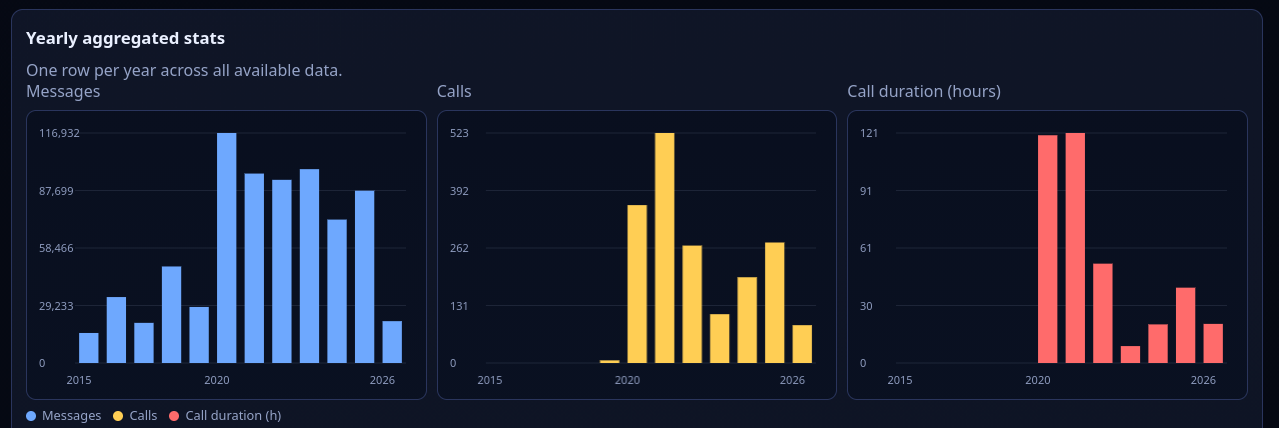
So let's dive deeper into this and have a look at the top 5 for 2020-2026.
Changes, Shifts, Stability and Returns
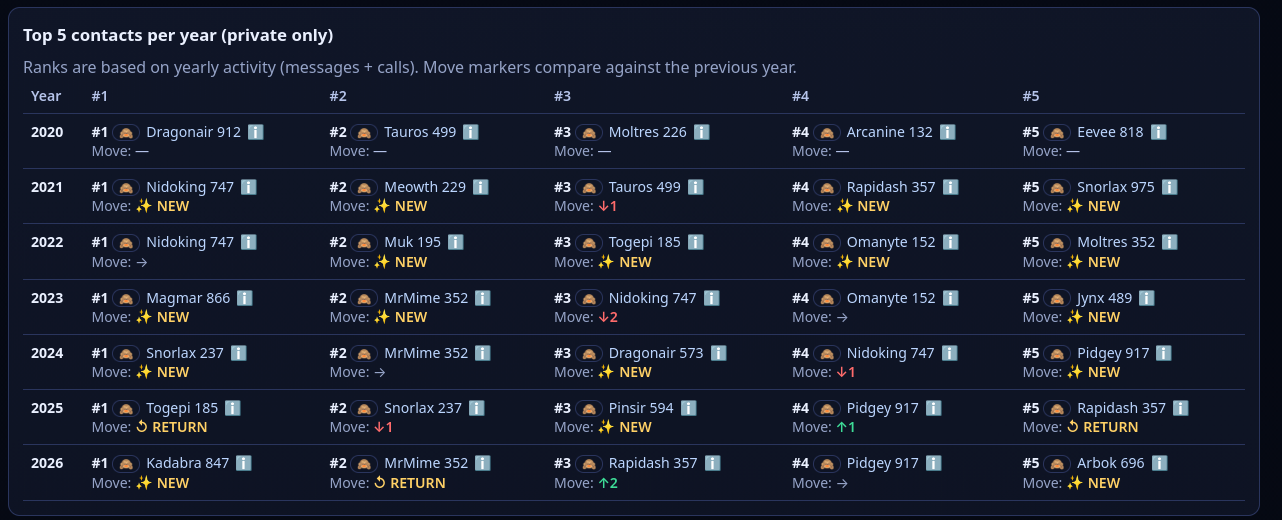
I think I see exactly what I would expect: Dynamics of Friendships, getting to know people or deep-diving into sidequests or niche interests.
The (bit more) Raw Data
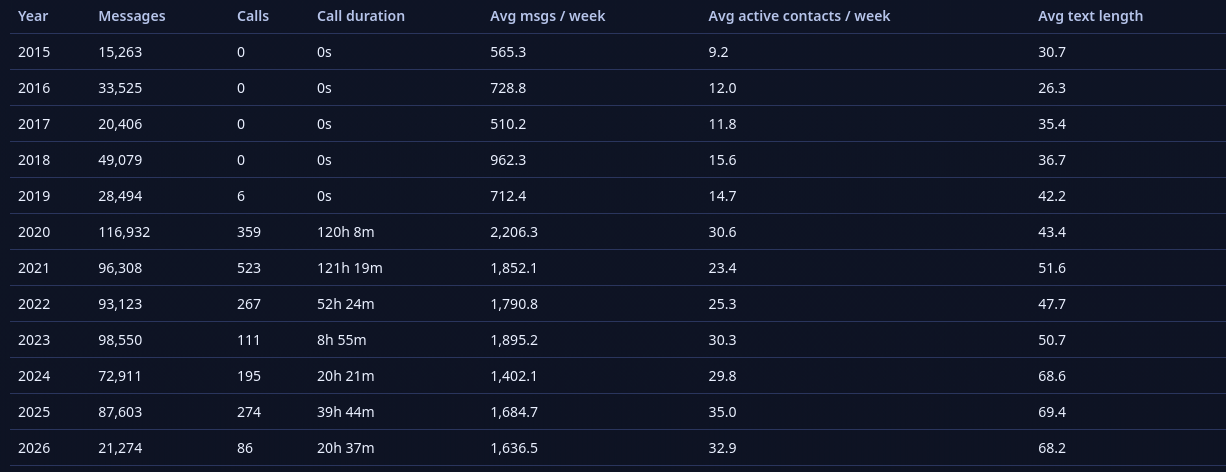
In case you're a raw data enjoyer, here you go. I won't comment on them, but just leave them as an idea.
Conclusion
Looking at the data, a lot of what I see makes sense to me and seems to be linked to the life-events in the respective period of time. There are a few interesting outliers (especially in years that are further away now) that I either never noticed, was not aware off or have worn off in the meantime. The 70k+ message outlier is remarkable - I expected an outlier for that contact but I definitely did not expect such an outlier.
I will continue to not delete (digital) data as someone (read: I) will probably analyze it at some point. Genuinely enjoyed this deep-dive and I am looking forward to seeing how the coming years and different life situations keep impacting the data.
Disclaimer
Before I end this post, some things I consider important to say:
- Friendships are not defined by the amount/duration of messages/calls exchanged per-se. Yes, I'd say that the people / pokémons above are quite good friends of mine, but quite good friends of mine are not necessarily found in my texts/calls. Some of them I also spend quality time with in person and all of the above does not cover that.
- Data might be lacking or wrong: I know of at least one contacts in my data where calls did not get exported correctly. I might deep into that later. Consider the above a good approximation, not the full truth.
- I haven't fully verified the Analysis Script. Yes, I did some spot-checks and it seems to check-out. Still, no full guarantee.
Do It Yourself!
Did you get a taste for such analyses? Well, you can do it yourself! Just follow the steps outlined above. And the analysis script is hosted on my git:
 dario
dario
Something doesn't work?
Something is missing?
You want to add Discord or Signal support?
-> Write a comment or send me a text!